Paper Won’t Feed
January 22, 2010 | Leave a Comment
My Fine Art Digital Printing DVD offers many simple solutions to common problems. Here’s one …
Problem
The paper won’t feed. It jams or feeds through without printing.
Solution
Make sure your paper is seated correctly in the printer.
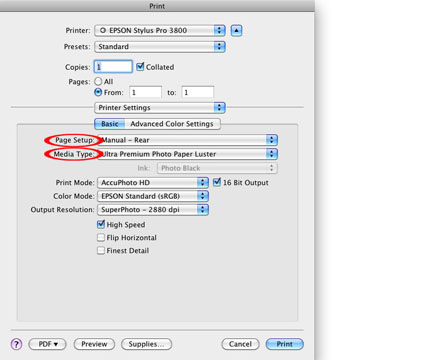
Setting for Epson Exhibition Fiber Paper on Manual Rear.
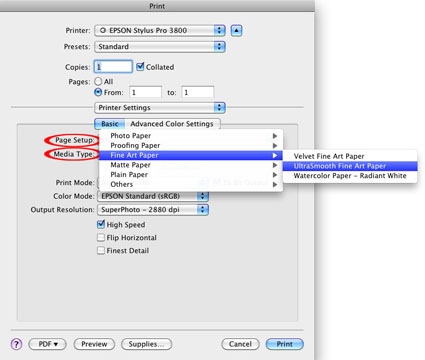
Setting for Epson UltraSmooth Fine Art Paper on Manual Rear.
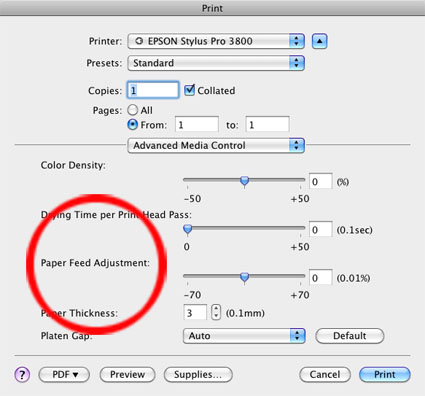
Check your Paper Feed setting and if the problem persists, adjust the Platen Gap.
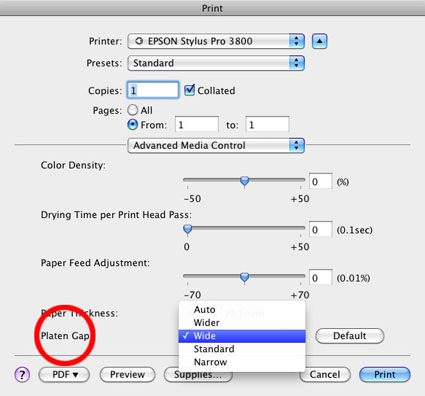
Thicker papers need to be fed with the Manual Rear option. Make sure you’re using it and you’ve specified this in the printer driver. You may still need to adjust the Platen Gap to a wider setting for thicker media (like Epson Exhibition Fiber Fine Art Paper). Many thicker papers will tend to jam when feeding them in bulk. You may need to feed them one at a time. Sometimes, you even need to give the paper a gentle nudge when the printer first feeds it.
Learn more in my Fine Art Digital Printing Workshops.

Print Borders Aren’t Equal
January 21, 2010 | Leave a Comment
My Fine Art Digital Printing DVD offers many simple solutions to common problems. Here’s one …

Problem
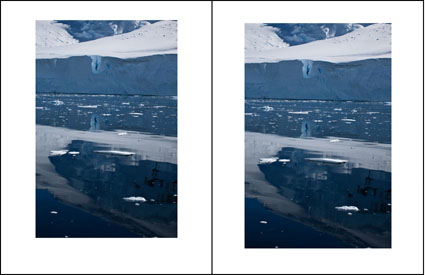
The borders on my print aren’t equal.
Solution
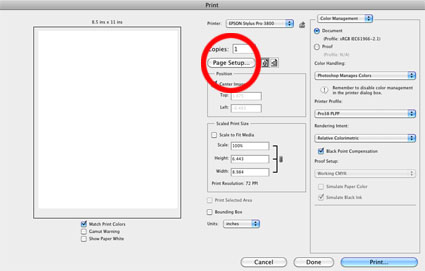
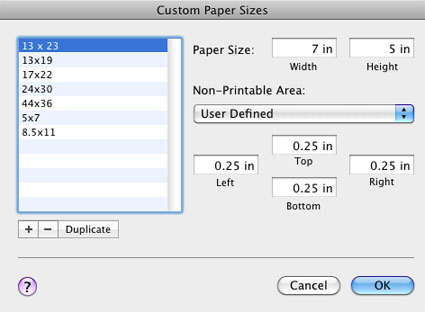
Create a Custom Paper Size with equal borders.


Learn more in my Fine Art Digital Printing Workshops.

Printing Off Paper
January 20, 2010 | Leave a Comment
My Fine Art Digital Printing DVD offers many simple solutions to common problems. Here’s one …

Problem
My image printed off the edge of the paper.
Solution
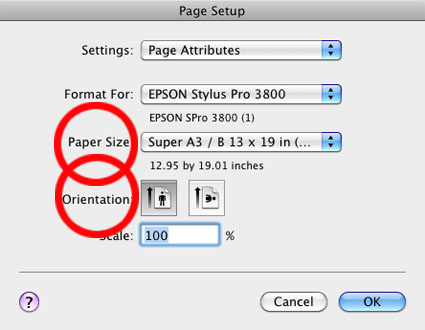
Reset the Page Setup. Check paper size and orientation and borders.


If you’re using an unusual sheet size create a Custom Paper Size.
Learn more in my Fine Art Digital Printing Workshops.

Printer Power Cleaning Cycles
January 19, 2010 | 1 Comment
My Fine Art Digital Printing DVD offers many simple solutions to common problems. Here’s one …
Problem
I cleaned the heads but they’re still clogged.
Solution
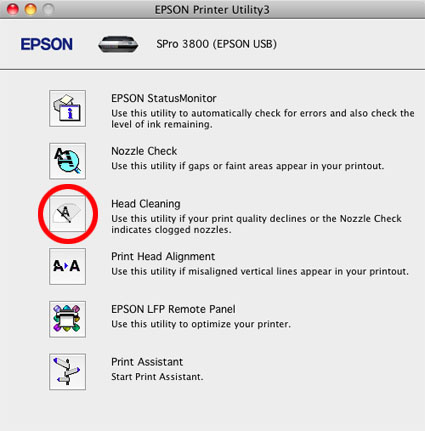
Clean them again. The fourth time in a row initiates a power cleaning cycle.

New Epson printers have anti-clogging coatings on the nozzles and initiate self-clean cycles automatically.
When power cleaning cycles don’t work you can humidify the heads (rest them no wet sponge for a while).
You’ll need to perform nozzle checks more often if you’re in a very dry environment (air conditioning dries) or you don’t use a printer for extended periods of time.
Learn more in my Fine Art Digital Printing Workshops.
Light Micro-Banding
January 18, 2010 | Leave a Comment
My Fine Art Digital Printing DVD offers many simple solutions to common problems. Here’s one …

Problem
I’ve got white micro-banding in my print(s).
Solution
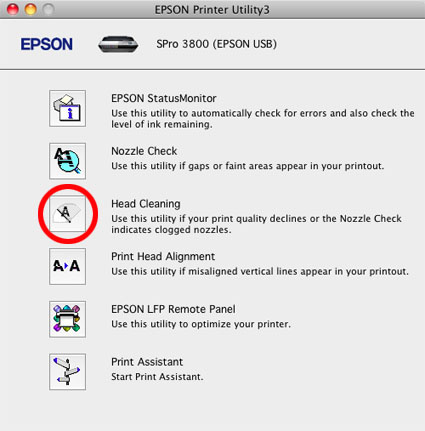
Check for nozzle clogs with the Printer Utility.

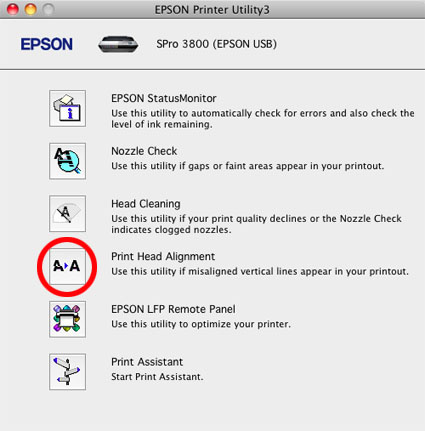
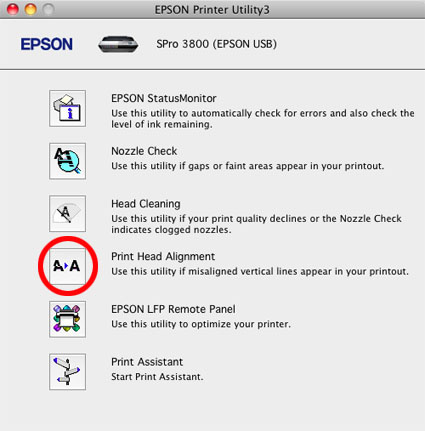
Realign the print heads with the Printer Utilities.

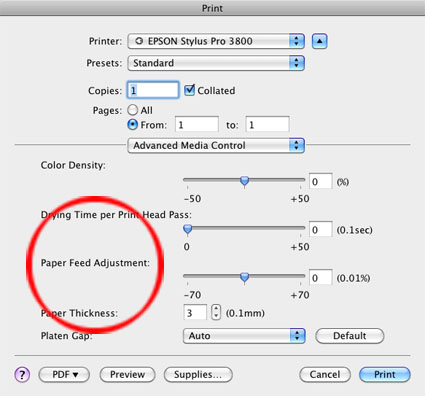
If the problem persists, adjust print speed slower with Advanced Media Control’s Paper Feed Adjustment.

In rare cases, the media feed speed can’t be adjusted with software adequately and that means it’s time to send a printer in for servicing.
Learn more in my Fine Art Digital Printing Workshops.
Colored Micro-Banding
January 17, 2010 | Leave a Comment
My Fine Art Digital Printing DVD offers many simple solutions to common problems. Here’s one …

Problem
I’ve got colored micro-banding in my print(s).
Solution
Unclog the nozzles with the Printer Utility.

Colored micro-banding means one of the inkheads isn’t firing. It’s not always uniform.
Learn more in my Fine Art Digital Printing Workshops.
Dark Micro-Banding
January 16, 2010 | Leave a Comment
My Fine Art Digital Printing DVD offers many simple solutions to common problems. Here’s one …

Problem
I’ve got dark micro-banding in my print(s).
Solution
Realign the print heads with the Printer Utility. If printing on High Speed, try printing with High Speed off.

If the problem persists, adjust print speed with Advanced Media Control’s Paper Feed Adjustment.

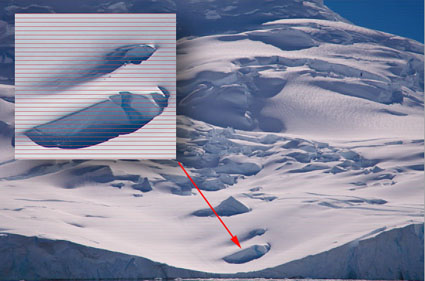
Dark micro-banding happens when lines of ink overlap each other. Imprecise head alignment is the most common problem. Less frequently, the speed media is feed through the printer is slightly off. In rare cases, the media feed speed can’t be adjusted with software adequately and that means it’s time to send a printer in for servicing.
Learn more in my Fine Art Digital Printing Workshops.

Banding
January 15, 2010 | Leave a Comment
My Fine Art Digital Printing DVD offers many simple solutions to common problems. Here’s one …
Problem
I’ve got broad linear banding in my print(s).
Solution
Make sure your data transfer from computer to printer is fast and uninterrupted.
Do use a fast connection like USB2 or Ethernet.
Don’t use a cord that too long – less than 12 feet.
Don’t tie up your computer up with tasks other than printing.
As this is a data transfer issue, it affects larger prints (more data) more than smaller prints (less data).

Don’t confuse this type of banding with micro-banding (small thin lines) or non-linear banding (in the file).
Learn more in my Fine Art Digital Printing Workshops.
Delete & Reload Printer Driver
January 14, 2010 | Leave a Comment
My Fine Art Digital Printing DVD offers many simple solutions to common problems. Here’s one …
Problem
I sent a file to the printer but the printer won’t start.
Solution
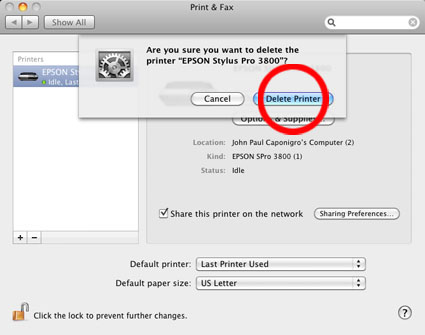
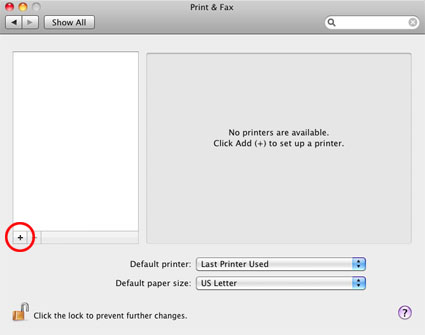
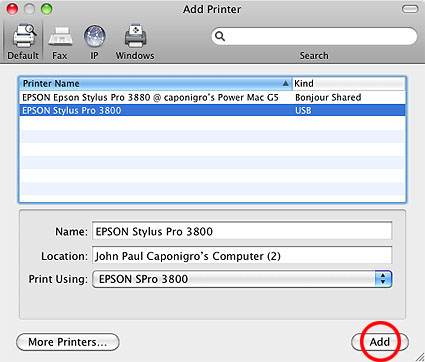
Delete and reload the printer driver.
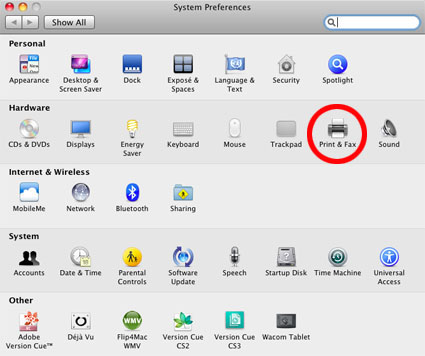
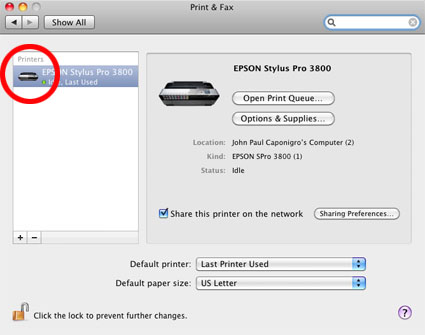
On a Mac, go to System Preferences, click Print&Fax, highlight the printer, check the – button, then check the +, click on the icon for your printer and check Add.


Remember to have your printer plugged in and turned on when you do this. Don’t confuse this with going to the manufacturer’s website and downloading the latest driver.
Communication errors between the computer and printer happen frequently, most often when ink or paper type is changed, stalling the print queue. Deleting and reloading the printer driver is a simple solution that fixes it immediately.
Learn more in my Fine Art Digital Printing Workshops.
Locating Printer Utilities
January 13, 2010 | Leave a Comment
My Fine Art Digital Printing DVD offers many simple solutions to common problems. Here’s one …
Problem
I can’t find my printer utilities.
Solution
On a Mac, go to System Preferences, click on Print&Fax, double click on the icon for your printer, click Printer Setup, click Utility, Click Open Printer Utility.


The most common uses for the printer Utility are to remove nozzle clogs and to align print heads. New Epson printer models are self-cleaning and self-aligning so you won’t have to do this often. But when the automated systems fall short, knowing where this utility is can be helpful.
Subscribe
Get the RSS Feed-
- Adventures
- Alumni
- Antarctica
- Antarctica 2009
- Apps
- Audio
- Books
- Business
- Calendar
- Canon Cameras
- Causes
- Cell Phone
- climate change
- Collected
- Color
- Composition
- Contests
- Conversations
- Creativity
- Destination
- Disclosure
- Discount
- Drawing
- DVDs
- eBooks
- Editing
- Environment
- Epson Print Academy
- Equipment
- Event
- Exercises
- Exhibit
- Experiment
- Exposure
- Green Actions
- Greenland
- Guest Blog
- Huffington Post
- iceland
- Images
- Influences
- Inspiration
- Interviewed
- iPad
- iPhone
- Lecture
- Lighting
- Lightroom
- Magazine
- Map
- Masterworks In My Collection
- Media
- Meditation
- Multimedia
- Namibia
- News
- Optical Illusions
- Packing
- People
- Photographer's Favorite Quotes
- Photographers
- Photographers – Q&A
- Photographers On Photography
- Photographers Video Conversation
- photography
- Photoshop
- Postcards
- Printing
- Published
- Q&A
- Quotes
- R/Evolution
- Radio
- Reading
- Requests
- Review
- Reviewing
- Science
- Screensaver
- Sculpture
- Seminar
- Sharpening
- Slideshow
- Social Causes
- Social Networks
- Software
- Special Guest
- Special Offer
- Statements
- Storytelling
- Technique
- Technology
- The Making Of The Print
- The Stories Behind The Images
- Travel
- Uncategorized
- Video
- Video – Artists
- Video – Creativity
- Video – Lightroom
- Video – Photographers
- Video – Photography
- Video – Photoshop
- Video – Quick Tips
- Website
- Winners Of The Day
- Workshop Giveaways
- Workshops
- Writing
- X-Rite i1Photo Pro
Archives
-
- May 2013
- April 2013
- March 2013
- February 2013
- January 2013
- December 2012
- November 2012
- October 2012
- September 2012
- August 2012
- July 2012
- June 2012
- May 2012
- April 2012
- March 2012
- February 2012
- January 2012
- December 2011
- November 2011
- October 2011
- September 2011
- August 2011
- July 2011
- June 2011
- May 2011
- April 2011
- March 2011
- February 2011
- January 2011
- December 2010
- November 2010
- October 2010
- September 2010
- August 2010
- July 2010
- June 2010
- May 2010
- April 2010
- March 2010
- February 2010
- January 2010
- December 2009
- November 2009
- October 2009
- September 2009
- August 2009
- July 2009
- June 2009
- May 2009
- April 2009
- March 2009
- February 2009
- January 2009
- December 2008
- November 2008
- October 2008
- September 2008
- August 2008
- July 2008
- June 2008
- May 2008
- April 2008
- March 2008
- February 2008
- December 2007
- September 2007
- April 2007
- March 2007
- February 2007
- December 2006
- November 2006
- October 2006
- August 2006
Categories
Blogroll
Topics & Friends
WP Cumulus Flash tag cloud by Roy Tanck requires Flash Player 9 or better.