20 Quotes By Photographer Arnold Newman

 
Enjoy this collection of quotes by photographer Arnold Newman.
“There are many things that are very false about photography when it is accepted without question. You must recognize and interpret it as you would any other art form, and then maybe it is a little more than real.” – Arnold Newman
“A lot of photographers think that if they buy a better camera they’ll be able to take better photographs. A better camera won’t do a thing for you if you don’t have anything in your head or in your heart.”
― Arnold Newman
“We don’t take pictures with cameras – we take them with our hearts and minds.” – Arnold Newman
“The camera is a mirror with a memory, but it cannot think.” – Arnold Newman
“Visual ideas combined with technology combined with personal interpretation equals photography. Each must hold it’s own; if it doesn’t, the thing collapses.” – Arnold Newman
“Influences come from everywhere but when you are actually shooting you work primarily by instinct. But what is instinct? It is a lifetime accumulation of influence: experience, knowledge, seeing and hearing. There is little time for reflection in taking a photograph. All your experiences come to a peak and you work on two levels: conscious and unconscious.” – Arnold Newman
“There are very few Cartier-Bressons, Brassais, and W. Eugene Smiths in the world, but to me these men are photographers. They are artists because they make statements that all of us wish we could have made.” – Arnold Newman
“I didn’t set out to do something different so much as do something that interested me. I wasn’t trying to be avant-garde – that’s being fashionable. You don’t set out to revolutionize art, you make statements for yourself.” – Arnold Newman
“The photographer must be a part of the picture.” – Arnold Newman
“I don’t think any student, any photographer, any person should take pictures the way I take pictures. I build them because it’s the way I am, and that’s the way I should be. If I try to be something else and try to take pictures or talk to you humorously because I think I’ll get a few laughs, no. Somebody else, like Duane Michals might be basically funny. He is that way, he makes me laugh all the time. But he is being himself. A writer must be himself, a painter, all of us – or else suddenly we lose what we have.” – Arnold Newman
“A preoccupation with abstraction, combined with an interest in the documentation of people in their natural surroundings, was the basis upon which I built my approach to portraiture. The portrait of a personality must be as complete as we can make it. The physical image of the subject and the personality traits that image reflects are the most important aspects, but alone they are not enough…We must also show the subject’s relationship to his world either by fact or by graphic symbolism. The photographer’s visual approach must weld these ideas into an organic whole, and the photographic image produced must create an atmosphere which reflects our impressions of the whole.” – Arnold Newman
“There are no rules and regulations for perfect composition. If there were we would be able to put all the information into a computer and would come out with a masterpiece. We know that’s impossible. You have to compose by the seat of your pants.” – Arnold Newman
“I am always lining things up, measuring angles, even during this interview. I’m observing the way you sit and the way you fit into the composition of the space around you.” – Arnold Newman
“I think photography is a matter of controlling what’s in front of you and making it do your will. This, of course, implies absolute mastery over camera, medium, techniques, and the ability to work with the subject and get him willingly and happily without any self-conscious feeling to fall into those things which are natural to him. This is a very complicated thing to do in portraiture. Mine are deliberately self-conscious portraits and therefore contain no forced feeling of candidness… the subject is unaware of the fact that I am waiting – things begin to happen – the man begins to reveal himself. If the background becomes overwhelming and you lose the personality, then I have not made a good portrait and it is not a good picture. I think the world is full of intelligent people who are not really trying to be flattered; what they really want is to be understood”. The more I get to know my subject the more he gets to know me, and so often the pictures taken at the end of a sitting are much better both creatively and interpretively… A photographer is always in a state of preparing himself for a given moment… we have only an instant in which to think and act.” – Arnold Newman
“It seems to me that no one picture can ever be a final summation of a personality. There are so many facets in every human being that it is impossible to present them all in one photograph.” – Arnold Newman
“I’m convinced that any photographic attempt to show the complete man is utter nonsense, to an extent. We can only show, as best we can, what the outer man reveals; the inner man is seldom revealed to anyone, sometimes not even to the man himself. We have to interpret.” – Arnold Newman
“Photography, as we all know, is not real at all. It is an illusion of reality with which we create our own private world.”- Arnold Newman
“Fantasy is like poetry; it can point to the truth.” – Arnold Newman
“I don’t care what you do with that negative, you can retouch it, you can spit on it, you can grind it underfoot. The only thing that matters is if it is honest. If (the picture) is honest, you and everybody can tell. If it is dishonest, you and everybody can tell.” – Arnold Newman
“I often wonder whether I would have done as well in painting.” – Arnold Newman
“Photography is 1% talent and 99% moving furniture.” – Arnold Newman
Read more in The Essential Collection Of Photographers’ Quotes.
View 12 Great Photographs By Arnold Newman.
View more in The Essential Collection Of Photographers Videos.
Find out more about Arnold Newman here.
Using The Power of Photoshop’s Color Blend Modes

BlendModes_B4After
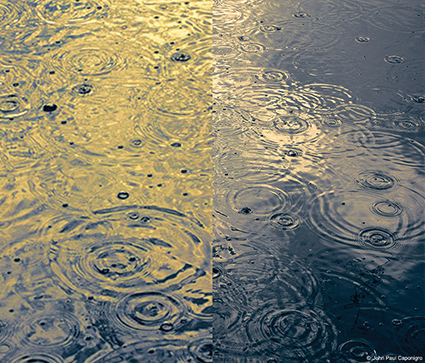
 Contrast added – Normal and Luminosity blend modes compared.

BlendMode_Hue

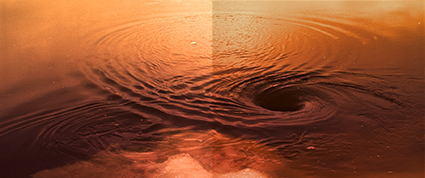
Hue adjusted – Normal and Hue blend modes compared.

BlendMode_Color

Hue adjusted – Normal and Color blend modes compared.

BlendMode_Saturation

Saturation added – Normal and Saturation blend modes compared.

When you adjust color in digital images, several common unintended byproducts arise. Increase or decrease contrast and saturation will rise or fall. Increase or decrease saturation and lightness will change. Make a hue adjustment with Curves (or Levels) by targeting specific channels, and an image will either lighten or darken. Make a hue adjustment with Hue/Saturation, and both saturation and luminosity are likely to shift, sometimes lightening and other times darkening. Correct one problem, and you may create another. Sometimes these byproducts are desirable; usually, they are not. While these changes may be minor, sometimes insignificant, when making subtle adjustments, they can become major when making more dramatic adjustments.

Is there a cure? There are several!

You can make additional adjustments to correct the byproducts of one adjustment. For instance, to compensate for value shifts when making color adjustments by targeting individual channels with Levels or Curves, many return to the Master channel to correct the accompanying shifts in value. To correct saturation shifts when contrast has been increased or decreased, a second adjustment is often made with Hue/Saturation. Some of these moves bring new problems with them, which will, in turn, need additional adjustment. If the problems are minor, usually, the byproducts are accepted. This is appropriate only when the byproducts are desirable and far less than ideal when they are not.

Most of these moves are made in an attempt to stabilize one component of color while another shifts.

Color can be broken down into three essential elements; hue (a spectrum around the color wheel from red through yellow, green, blue, cyan, magenta, and back to red), saturation (a gradient from intense to dull), and luminosity (a gradient from dark to light). These problematic byproducts, typically found in standard methods of color adjustment, arise because only a few exotic color spaces treat the three distinct qualities of color separately. To control only one quality in RGB and CMYK, you typically have to make adjustments to more than one channel. In LAB, luminosity has its own separate channel, and you can make adjustments to it alone, but saturation and hue are still wrapped into two channels, A and B. The color spaces that treat all three elements separately, HSB, HSL, and HSV, are not supported by Photoshop (or Lightroom).

Some adjustment tools allow you to make adjustments to one component of color without affecting the others. Favor them whenever practical. For instance, you can check Preserve Luminosity when using Color Balance to stabilize brightness when making adjustments to hue. This works well when adjustments are made to the midtones. But, when targeting highlights and/or shadows, brightness or contrast may shift. Tools like these build the solution for the problem directly into their interface. But these tools are not always the tools we need to accomplish a given task, nor are they the most precise.

Some tools even produce problems that are not curable. For example, increasing or decreasing value using the Lightness slider with Hue/Saturation will reduce an image’s dynamic range, making white or black gray while darkening or lightening. The best policy is to avoid using these tools altogether. You can do more and do it with greater precision using other tools. (In this specific case, use Curves.)

Wouldn’t it be nice if you could target one specific component of color without affecting the others with any color adjustment tool? When you use Photoshop, you can. You can use the blending mode of adjustment layers to constrain the effects of an adjustment to one or more components of a color. If you are making an adjustment directly to an image without using adjustment layers, you can Fade (Edit: Fade) the problem away immediately after applying the adjustment. Unfortunately, you cannot do this during Raw conversion with either Lightroom or ACR. Many of these side effects are built into the behavior of the sliders, and no additional blend mode feature exists.

You’ll find all of the blend modes in Photoshop’s Layers palette. All layers, including adjustment layers, have a blending mode. A layer can only have one blending mode, but a layer’s blending mode may be changed at any time. The default is Normal. But there are many other modes to choose from. The long list of options you will find under the blending mode pull-down menu, offering seventeen choices in all, may seem overwhelming at first and deter you from using them altogether. While some experimentation with all of the blending modes may prove fruitful, start with the four that are most useful for color adjustment – the four that target specific components of color; Hue, Saturation, Color, and Luminosity.

You can use the adjustment layer blending modes of Hue, Saturation, Color, and Luminosity, to target single color components, regardless of which space you are editing in. The blending mode of an adjustment layer constrains the effects of an adjustment to the component of the color specified in its title. Hue allows an adjustment layer to affect only hue, eliminating shifts in luminosity. Saturation allows an adjustment layer to affect only saturation, eliminating shifts in luminosity. (Use this for most saturation adjustments, for instance, when you use Hue/Saturation.) Color allows an adjustment layer to affect both hue and saturation, eliminating shifts in luminosity. (Use this for most hue adjustments, for instance, when you use a single channel in Curves.) Luminosity allows an adjustment layer to affect only value or brightness, eliminating shifts in saturation. (Use this for most contrast adjustments, for instance, when you use the master channel in Curves. This functions just like adjusting the L channel in LAB without having to make a color mode conversion, possibly forcing you to flatten a file.)

You can specify the blending mode of an adjustment layer when you first create it. Or, you can change the blending mode of an adjustment layer after its creation. Either way, it’s more than likely that you will want to compare the effects of both the alternate blending mode and the Normal blending mode. Sometimes, you may find you like the side effects and don’t want to remove them. In these cases, leave the blend mode on its default Normal. As a rule, with exceptions, I recommend you use the blend mode that targets the element of color you are adjusting.

You cannot reduce a blending mode by a percentage; it’s an all-or-nothing proposition. If, for instance, you want to remove most, but not all, of the additional saturation introduced by a shift, in contrast, you will need to choose a blending mode, either blending mode – Normal or Luminosity and then make an additional Hue/Saturation adjustment. Pick the mode that gets you closest to the result you desire, and then fine-tune the final effect with a subsequent adjustment.

The precision and degree of control over color you can acquire today is nothing short of astonishing. It is responsible for producing a dramatic r/evolution in color photography. We now have near total control of color’s three primary elements – hue, saturation, and luminosity. Add to this nonlinear color adjustment (even color transformation) the ability to affect specific hues without affecting others. Add to this the ability to make adjustments to specific ranges within each of those components, for instance, the saturation of highlights and/or shadows, rather than the component in its entirety. And there are many other possibilities. You can do virtually anything. You need only imagine the possibilities and then find the right tool for the job.

Read more about Color Adjustment here.
Learn more in my digital photography and digital printing workshops.