Using The Image Processor – Richard Harrington
September 29, 2011 | Leave a Comment
Richard Harrington demonstrates how to use Photoshop’s Image Processor.
His example is for video slideshows, but the technique can be applied to anything.
View more Photoshop videos here.
Learn more in my digital photography and digital printing workshops.
Draw A Perfect Circle Around An Object – Julianne Kost
September 28, 2011 | Leave a Comment
In this quick tip, Julieanne Kost demonstrates the most flexible way to create a transparent circle around an object.
View more Photoshop videos here.
Learn more in my digital photography and digital printing workshops.
Blending Images In Photoshop – Russell Brown
September 27, 2011 | Comments Off
Russell Brown demonstrates an essential Photoshop technique how to combine two photographs using a gradient mask.
View more Photoshop videos here.
Learn more in my digital photography and digital printing workshops.
Let’s Take Back The Internet – Rebecca McKinnon
September 25, 2011 | Leave a Comment
In this powerful talk from TEDGlobal, Rebecca MacKinnon describes the expanding struggle for freedom and control in cyberspace, and asks: How do we design the next phase of the Internet with accountability and freedom at its core, rather than control? She believes the internet is headed for a “Magna Carta” moment when citizens around the world demand that their governments protect free speech and their right to connection.
Find more of my favorite TED videos here.
Making Relative Versus Absolute Adjustments In Lightroom – Julianne Kost
September 24, 2011 | Leave a Comment
Julieanne Kost demonstrates the differences between making absolute adjustments to photographs using Lightroom’s Develop module and relative adjustments using the Quick Develop panel.
View more Lightroom videos here.
Learn more in my digital photography and digital printing workshops.
Benefits of Editing Images In 16 Bit Mode
September 21, 2011 | Leave a Comment
More bits of data make more shades of gray.
What’s the difference between 8-bit and 16 bit? The number of shades of gray. 256 versus 65,536 to be exact. With more shades of gray, gradation becomes smoother.
How do you get at these numbers? Digital files are binary. 2 to the 8th power is 256. 2 to the 16th power is 65,536.
2 1 = 2
2 2 = 4
2 3 = 8
2 4 = 16
2 5 = 32
2 6 = 64
2 7 = 128
2 8 = 256
2 9 = 512
2 10 = 1024
2 11 = 2048
2 12 = 4096
2 13 = 8192
2 14 = 16,384
2 15 = 32,768
2 16 = 65,536
16-bit files take twice as much memory to store all those shades of gray. It’s worth it. For an arithmetic increase in file size you get a logarithmic increase in the number of shades of gray.
256 shades of gray are just enough shades of gray to do reasonably well for most imaging applications. The human eye can see approximately 1,000 shades of gray. With 65,536 shades of gray, 16-bit files contain tens of thousands of shades of gray more than you can see.
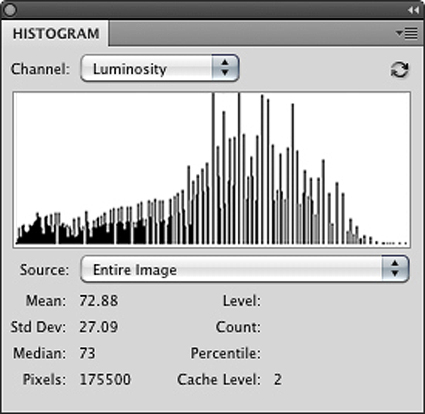
So what are all those extra shades of gray good for? Editing your files to get the best results possible. When a digital file is edited, it loses some shades of gray. If a digital file contains too few shades of gray, it begins to posterize. You may see signs of posterization if an image’s histogram displays combing or gaps and spikes. Before you panic, examine smooth areas of an image to make sure there’s visible posterization. Do this at 100% screen magnification; many times the posterization you see on a monitor is a result of a monitor not being able to display the data as smooth as it is at other screen magnifications. 16-bit files contain so many shades of gray, it’s very difficult for posterization to occur with normal editing – unless you deliberately posterize it with digital filtration.
16-bit doesn’t extend color gamut; 16-bit files can be either small or wide gamut. 16-bit is recommended for files created in wide-gamut color spaces, like Pro Photo RGB, because the steps between tonal values are spread out over a larger distance to achieve greater saturation and so tend to posterize more quickly.
16-bit doesn’t extend dynamic range; it doesn’t generate a blacker black or a whiter white. 16-bit source files are recommended for high dynamic range because HDR images are heavily processed when tone-mapped and would posterize without higher bit depths. In HDR processing, multiple bracketed 16-bit files are combined into a single file with a 32-bit mode used to hold the varied data they contain over a dynamic range that is wider than the device that created them. A 32-bit file is subsequently tone-mapped and rendered down to a 16-bit file with an improved dynamic range.
With the exception of 32-bit files used for HDR tone-mapping, files in Adobe Photoshop can either be either 8-bit or 16-bit.
To get true 16-bit data, you need to generate it when you create a digital file – and preserve it during image editing. JPEG files can’t contain 16-bit data; they’re cooked down to 8-bit. Raw files can. (So can scanned images.)
Not all Raw files contain a true 16-bits of data. While many DSLRs can only generate 10-bits, 12-bits, or 14-bits data, all DSLR Raw files contain more than 8-bits of data, which can only be preserved in Photoshop if edited in 16-bit mode.
You can change a digital file’s mode from 8-bit to 16-bit, but doing this won’t magically add shades of gray to the old 8-bit data; all this does is create the possibility of adding new 16-bit data information on top of the old 8-bit data; and it doubles a file’s size.
Editing files in 16-bit mode limits some of Photoshop’s functionality; many filters don’t work in 16-bit mode.
You can apply a filter to an 8-bit copy of a 16-bit file and drop and drag the filtered file into the original 16-bit file as a layer. Again, the layer won’t have 16-bits of data and may be adversely affected by subsequent edits if they are aggressive. If edited minimally, the results can be quite acceptable.
Editing your images in 16-bit mode is worth the time and effort. You’ll generate fewer imaging artifacts during editing and so create better finished files.
Right now, creating 16-bit files is largely about generating the best 8-bit data. (Most monitors can only display 8-bits of data. Improved results in print can only be discerned by the very discriminating eye in select files.) In the future, when monitors and printers make better use of more than 8-bit data, you’ll begin to see visible improvements in gradation when your images are viewed in both display and print.
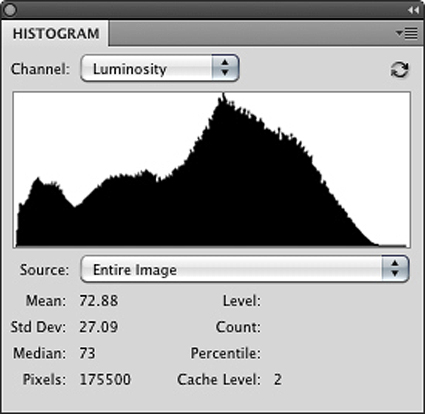
Gaps happen when contrast is increased; tones that were close together are spread apart. Spikes happen when contrast is reduced; tones that were close together become the same.
Avoid this by editing in 16-bit.
Read more in my digital printing and digital photography ebooks.
Learn more in my digital printing and digital photography workshops.

Lightroom 3 Print Module Tips – Julianne Kost
September 20, 2011 | Leave a Comment
Julieanne Kost focuses on little known features and helpful hints for making the most out of the Lightroom Print Module. Learn how to create a template for posting images to your blog using the print to JPEG option, apply custom edge effects and backgrounds using Identity Plates, screen back images using the Tone Curve, and more!
View more Lightroom videos here.
Learn more in my digital photography and digital printing workshops.
Canon Tips & Tricks
September 19, 2011 | Leave a Comment
Want a quick answer to a question about a Canon camera?
Want to learn a camera function or technique you never knew about?
Canon offers a growing number of tips and tricks online.
You can filter over 200 tips by Category and/or Product.
Learn something today. Learn more in the future.
Find Canon’s Tips & Tricks here.
Learn more on achieving optimum exposures with my digital photography ebooks.
Playing For Change – 9/17/11
September 17, 2011 | Leave a Comment
This is inspiring!
Find out more about Playing For Change here.
The Inspiration
Playing for Change is a multimedia movement created to inspire, connect, and bring peace to the world through music. The idea for this project arose from a common belief that music has the power to break down boundaries and overcome distances between people. No matter whether people come from different geographic, political, economic, spiritual or ideological backgrounds, music has the universal power to transcend and unite us as one human race. And with this truth firmly fixed in our minds, we set out to share it with the world.
Chase Jarvis Live – Talks With Photographers
September 17, 2011 | Leave a Comment
Chase Jarvis talks with Chris Jordan – photographer to photographer.
Check out these other Chase Jarvis Live conversations with Zack Arias, Jeremy Cowart, Chris Jordan, Vincent LaForet and many others.
Read my conversations with photographers here.
keep looking »Subscribe
Get the RSS Feed-
- Adventures
- Alumni
- Antarctica
- Antarctica 2009
- Apps
- Audio
- Books
- Business
- Calendar
- Canon Cameras
- Causes
- Cell Phone
- climate change
- Collected
- Color
- Composition
- Contests
- Conversations
- Creativity
- Destination
- Disclosure
- Discount
- Drawing
- DVDs
- eBooks
- Editing
- Environment
- Epson Print Academy
- Equipment
- Event
- Exercises
- Exhibit
- Experiment
- Exposure
- Green Actions
- Greenland
- Guest Blog
- Huffington Post
- iceland
- Images
- Influences
- Inspiration
- Interviewed
- iPad
- iPhone
- Lecture
- Lighting
- Lightroom
- Magazine
- Map
- Masterworks In My Collection
- Media
- Meditation
- Multimedia
- Namibia
- News
- Optical Illusions
- Packing
- People
- Photographer's Favorite Quotes
- Photographers
- Photographers – Q&A
- Photographers On Photography
- Photographers Video Conversation
- photography
- Photoshop
- Postcards
- Printing
- Published
- Q&A
- Quotes
- R/Evolution
- Radio
- Reading
- Requests
- Review
- Reviewing
- Science
- Screensaver
- Sculpture
- Seminar
- Sharpening
- Slideshow
- Social Causes
- Social Networks
- Software
- Special Guest
- Special Offer
- Statements
- Storytelling
- Technique
- Technology
- The Making Of The Print
- The Stories Behind The Images
- Travel
- Uncategorized
- Video
- Video – Artists
- Video – Creativity
- Video – Lightroom
- Video – Photographers
- Video – Photography
- Video – Photoshop
- Video – Quick Tips
- Website
- Winners Of The Day
- Workshop Giveaways
- Workshops
- Writing
- X-Rite i1Photo Pro
Archives
-
- May 2013
- April 2013
- March 2013
- February 2013
- January 2013
- December 2012
- November 2012
- October 2012
- September 2012
- August 2012
- July 2012
- June 2012
- May 2012
- April 2012
- March 2012
- February 2012
- January 2012
- December 2011
- November 2011
- October 2011
- September 2011
- August 2011
- July 2011
- June 2011
- May 2011
- April 2011
- March 2011
- February 2011
- January 2011
- December 2010
- November 2010
- October 2010
- September 2010
- August 2010
- July 2010
- June 2010
- May 2010
- April 2010
- March 2010
- February 2010
- January 2010
- December 2009
- November 2009
- October 2009
- September 2009
- August 2009
- July 2009
- June 2009
- May 2009
- April 2009
- March 2009
- February 2009
- January 2009
- December 2008
- November 2008
- October 2008
- September 2008
- August 2008
- July 2008
- June 2008
- May 2008
- April 2008
- March 2008
- February 2008
- December 2007
- September 2007
- April 2007
- March 2007
- February 2007
- December 2006
- November 2006
- October 2006
- August 2006
Categories
Blogroll
Topics & Friends
WP Cumulus Flash tag cloud by Roy Tanck requires Flash Player 9 or better.