Print Proofs To See Undisplayable Colors
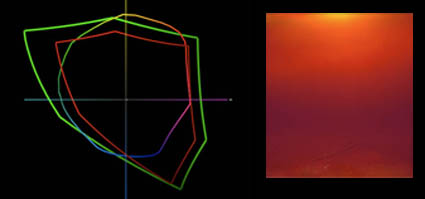

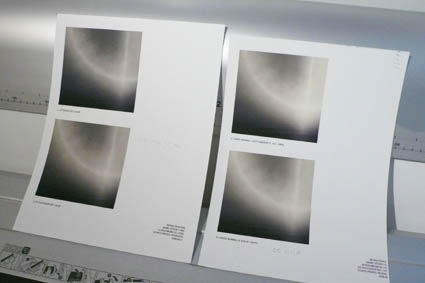
You softproof (constrain a monitor with an ICC profile) to see what colors are out of gamut of an ink and paper combination before you print. You proof (print) to see colors out of gamut of the monitor.
What? Yes! Today’s inksets exceed the gamut of of even the widest gamut monitors, in certain colors.
This graph shows ColorMatch (equivalent to most CRTs and LCDs), Adobe RGB 1998 (higher end LCDs), and Epson Ultrachrome HDR Ink on Epson Exhibition Fiber Paper. The new printers with the latest substrates can print more saturated yellows and oranges than even the best monitors can display. And, they can also print more saturated blues and greens than average LCDs can display. Evolution in printers is forcing an evolution in monitors.
Which monitor do I recommend? Check out my previous post here.
Check out my DVD 6 Simple Steps to Good Color Management.
Check out my DVD The Art of Proofing.

See me demonstrate this and more during the Epson Print Academy.
Learn these techniques in my workshops.
Printing – Humidity


Extreme humidity can impact print quality. This is particularly true for but not exclusive to matte papers, which are more absorbent.
We printed for my Annual Exhibit in high humidity. The paper had absorbed a lot of moisture and so there was substantially more dot gain. The prints were coming out substantially darker and we were having trouble maintaining shadow detail. It’s made me want to store all of my paper in a climate controlled environment (using a dehumidifier or air conditioner). Or, climate control my entire studio. Rather than reprofiling for an atmospheric condition that changes unpredictably, we compensated with proofing. We lightened the files selectively before printing. With a little testing, we came up with standard adjustments that could be used on multiple images, with customized shadow masks for individual compositions. It pays to think about the impact of humidity on your printing. Control humidity when you can. Compensate for it when you can’t. You get better prints.
What do you do to compensate for excessive dot gain due to environment or overinking? Comment here.
Check out my Printing downloads here.
Check out my DVD The Art of Proofing here.

Find out about my The Fine Digital Print Workshop Series here.

Printing – Proofing


Proofing is an essential part of making the finest prints possible.
While color management and softproofing get you 90% of the way there, there are all kinds of things you still need to check in hardcopy – materials, ink limit, sharpening to name a few. Every time I print an image, I create a BAT (a final proof) that I archive for future reference. The next time I print the same image the BAT tells me how I got the best results the last time it was printed. That then becomes a starting point for future improvements. Combine advancing technology (printers, ink, substrates) and good color management / proofing practices and you’ll find your print quality will constantly evolve.
Do you proof? What kinds of things do you routinely proof?
Check out my DVD 6 Simple Steps to Good Color Management here.
Check out my DVD The Art of Proofing here.
Check out my Proofing downloads here.
Find out about my digital printing workshop series The Fine Digital Print here.

Printing – Ideal Viewing Distance


Scale changes ideal viewing distance.
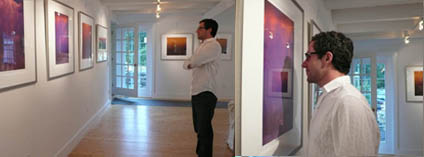
To see a 4×5” print you have to get close to it. You can’t see anything but its shape and color from the end of a long hall. To see a 6×10’ print in its entirety you have to stand well away from it. If you stand very close to it, you won’t be able to see the whole image, much less anything else.
The rule of thumb for determining ideal viewing distance is to stand at three times a print’s diagonal dimension. This tends to place the entire image well within a viewer’s field of vision in such a way that overall general detail can be resolved at once, minimizing panning and scanning.
Of course, zooming happens. Both artists and viewers tend to view works of art from many different distances; examining details closely and evaluating a total composition distantly. Viewing distance changes perceived scale. Viewing distance subtly changes the quality of the viewing experience. So viewers tend to compare a variety experiences, dynamically forming a total impression of a work of art.
What do you think the ideal viewing distance for prints is? Comment here!
Check out my Printing downloads here.
Check out my DVD The Art of Proofing here.

Find out about my The Fine Digital Print Workshop Series here.

Printing – Big Prints


Scale can have a dramatic impact on the way images are experienced.
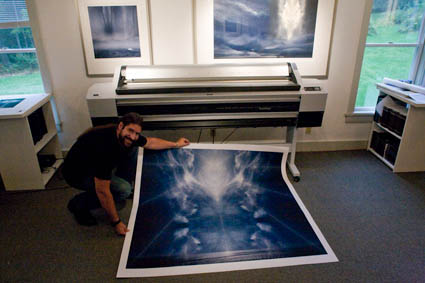
We’ve been printing up a storm here! All the prints are made on an Epson 11880. The prints can be very large. Up to 64″. How big do I typically print? Generally under 30×40″. Would I like to print bigger? Yes! Why don’t I print bigger more often?
Here’s the problem. How do you handle them during production? How do you present them (framed or unframed)? How will they fit in the exhibition space? How do you store them? When you get really big, all of these practical considerations become really significant.
New possibilities bring new opportunities and challenges.
How big have you printed? What did you do to overcome these considerations? Comment here!
Check out my Printing downloads here.
Check out my DVD The Art of Proofing here.

Find out about my The Fine Digital Print Workshop Series here.

Color Management & Proofing – Workshops, DVDs, Radio


We go into the ins and outs of advanced color management in my workshop series The Fine Digital Print. No matter what their level, it helps everyone participating. In my workshop The Fine Digital Print Advanced we take it step by step from concept to practice. In my even more advanced printing workshops The Fine Digital Print Expert and the Fine Digital Print Master we assume a higher level of knowledge and go into what doesn’t work perfectly. Here are a few examples. 1 – LCD monitors are too bright for precise prediction to print. 2 – Photoshop’s softproofing Simulate Paper Color is too aggressive.  3 – Printer drivers overink prints delivering slightly dark prints, typically losing subtle shadow detail. 4 – A majority of users don’t view their proofs and prints in ideal light. The cumulative effect leads many to think they’re doing something wrong (They might or might not be.) or that color management doesn’t work. It does. It just doesn’t work perfectly. And it’s important to know what the limitations are.
In my workshops, seminars, and DVDS, I cover what you can do to overcome these imperfections through proofing and then move on to other issues you can only address through proofing. Traditional photographic printing master John Sexton saw my demonstrations during the Epson Print Academy and remarked that watching them felt like deja vu because while the tools have changed the core concepts remain the same.
It’s been my mission to make color management relatively easy to understand and implement without dumbing it down. It can be done. No one else I know takes a more systematic and thorough an approach to proofing as I do.
I sat down several weeks ago with Scott Sheppard of Digital Photo Radio to talk about key Color Management and Proofing. Scott’s a great guy. Easy to talk with. Asks all the right questions. Scott’s one of the little guys doing big things. Digital Photo Radio is done entirely by one man. But the product is so good it seems like it’s created by an entire media team. I love to see individual entreprenuers go for it and succeed big. Scott’s done that.
Check out the audio cast and find out more about Digital Photo Radio here.
Check out my DVD 6 Simple Steps to Good Color Management here.
Check out my DVD The Art of Proofing here.
Check out free Color Management and Proofing resources on my website here.
Sign up for Insights enews to find out when new content is available here.