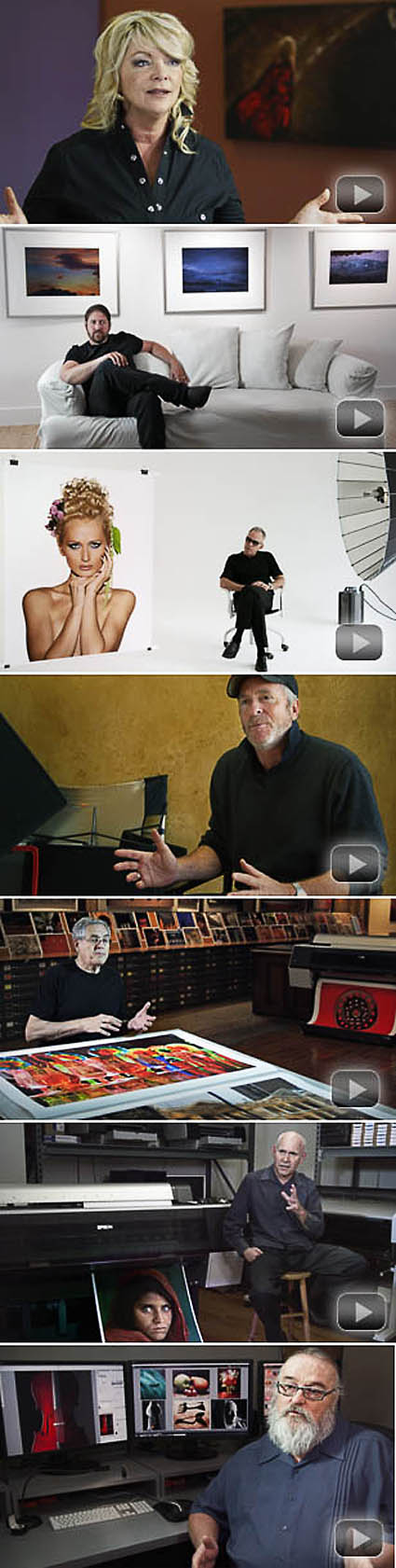
Bambi Cantrell, Douglas Dubler, Greg Gorman, Jay Maisel, Steve McCurry, and Jeff Schewe share their thoughts and feelings on their work and how they relate to it when it’s printed.

View my Epson video interview here.

Find out more about Epson Focal Points here.

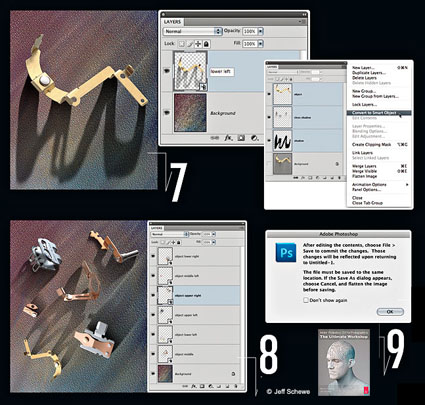
“Any “object” that needs the ability to adjust size and rotation without the normal limitations of layered images is an excellent candidate for Smart Objects … When doing a traditional multilayer composite, the resizing and rotation of a layer can cause image degradation. Positioning and sizing an object has to be a precise operation because if you use Free Transform to make a layer smaller and then find out you actually need it back at the original size (or bigger), you basically have to start over. The way to deal with this situation when doing a complex composite is to make those layers into Smart Objects. Smart Objects are embedded image objects that allow resizing, rotation and other select editing without changing the pixels in the object. The image layers are actually treated as a separate file embedded within the master file. You can’t do all editing on the Smart Object, but you can open the original layers as a temporary file and do pixel-level editing there and then save the changes back into the Smart Object; the changes will auto-update in the image in which the objects are embedded.” – Jeff Schewe

Read more about Smart Objects at Digital Photo Pro.
Get Schewe & Evening’s book CS5 for Photographers: The Ultimate Workshop.
Learn more with my online resources.
Learn more in my digital photography and digital printing workshops.

The vast majority of photographic images benefit from sharpening. Before you decide how and when to sharpen images, you need to decide why you’re sharpening them. The goal is to enhance detail rendition without producing distracting visual artifacts. You’ll find many conflicting philosophies and their accompanying strategies for sharpening images. The seemingly conflicting advice can be hard to reconcile.

Should you sharpen once or multiple times? Should you sharpen differently for different subjects? Should you sharpen differently for different sizes? Should you sharpen differently for different presentation materials or supplies? Should you view your files at 100% or 50% screen magnification?

Capture source, output device, substrate or presentation device, presentation size, subject and artistic intention all play a role in sharpening. The characteristics and solutions for many of these factors can be objectively defined for everyone; at least one of these factors—perhaps the most important, your artisti vision—only can be decided individually.

So, if sharpening is a complex subject, how do you simplify your sharpening workflow to one that’s practical without compromising quality?

Bruce Fraser and Jeff Schewe offer the best advice in their definitive volume on sharpening, Real World Image Sharpening with Adobe Photoshop Camera Raw and Lightroom, which is highly recommended reading for every photographer. Instead of sharpening your images for you, they teach you how to sharpen.

Their philosophy of sharpening is the soundest in the industry. They recommend that images be sharpened in a progression of three stages: once for capture sharpening, a second time for creative sharpening, and a third and final time for output sharpening. The objectives and methods of each of these stages vary considerably. When mastered, the whole process can be streamlined to achieve sophisticated results in minimum time …

Read more on Digital Photo Pro.

Learn more in my digital printing and digital photography workshops here.

See more in my Iceland digital photography workshop.

Get 15% off of Pixel Genius products with this code – JPC15CPN.

The people at Pixel Genius (Martin Evening, the late Bruce Fraser, Mac Holbert, Andrew Rodney, Seth Resnick and Jeff Schewe) produce terrific production tools for use within Photoshop – PhotoKit, Photo Kit Color, and Photo Kit Sharpener.

PhotoKit automates a variety of tasks including color correction, color to black and white conversion, toning, and basic sharpening. PhotoKit Sharpener automates some of the most sophisticated sharpening routines ever devised. They’re so sophisticated they were licensed and modified for Adobe’s Lightroom.

Read more

Happy Birthday Photoshop!

20 years? Yes! It was released in February 19, 1990.

Here’s a link to all of the release dates through CS2 in 2005.

And a fun article written by Jeff Schewe in 2000 about the history of Photoshop.

Photoshop changed photography.

Photoshop changed my life.

How has your life changed because of Photoshop?

Epson Focal Points

November 4, 2009 | Leave a Comment

epsonfocalpoints

Find out what Bambi Cantrell, John Paul Caponigro, Douglas Dubler, Greg Gorman, Jay Maisel, Steve McCurry, and Jeff Schewe have to say about the Epson Stylus Pro 900 Series printers. You’ll hear personal stories and real world case studies of how these printers are making the best prints possible.

View these seven new videos here.

By the way, the videos were produced by Epson’s Dan Steinhardt and the same team that produces Acme Educational DVDs – Vincent Versace and Mark Vanocur,

Learn more in my free downloadable Lessons.
Learn even more in my Fine Art Digital Printing Workshops.
Stay tuned for the release of my new DVDs Fine Art Digital Printing.

epson900videos

napphelp

H.E.L.P.

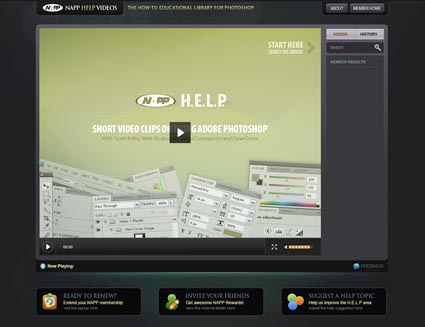
During the keynote of NAPP announced a new free resource to members. H.E.L.P. -  60 second online video tutorials. Need to know how to do something in Photoshop quick? Log on. Go to NAPP. Select and watch a video tutorial. 60 seconds later, you’ve got answers. It’s very powerful. It’s another great reason to be an NAPP member.

Find out more about NAPP here.

Find H.E.L.P. here.

I covered this morning’s keynote highlights live in real time with Twitter and my iPhone.

Read/see my live tweets of  the keynote highlights here.

Coblogging Photoshop World

We’re coblogging again. That is we’re all making posts about highlights of Photoshop World. Some of us will do it daily.

Here’s a list of possible participants.

Corey Barker
John Paul Caponigro
RC Concepcion
Dave Cross

Jim Divitale
Laurie Excell

Richard Harrington
Scott Kelby
Matt Koslowski
Deke McClelland
Joe McNally
John Nack
Moose Peterson
Jeff Schewe
Colin Smith
Ben Willmore
David Ziser

Precons at Photoshop World XVII start today.

We’re coblogging again. Presenters will try and make one post a day of a highlight.

I haven’t even started my Epson Print Academy Precon (today from 1-5 with Rodney and Schewe) yet and I’ve had a highlight. RC Concepcion, Matt Koslowski, Corey Barker and I were discussing shooting for HDR for their demo during their Precon session. RC had scouted locations and remarked that crowds might be a problem. So I offered an idea. Shoot 3 shots for each bracketed exposure (three each for low, medium and high). First merge the moving people out. Then use the remaining three merges for the HDR merge. This stuff gets you thinking – in new ways. I love it! I’ll be do this in my workshop in Palms Springs next week. Someone will let you know how it goes. When they do you’ll find a link here.

You can see what other presenters share each day by accessing these links.

Here’s a list of everyone who coblogged last year. Check back for more links each day.

Corey Barker
John Paul Caponigro
RC Concepcion
Dave Cross

Jim Divitale
Laurie Excell
Martin Evening

Richard Harrington
Scott Kelby
Matt Koslowski
Deke McClelland
Joe McNally
John Nack
Moose Peterson
Jeff Schewe
Colin Smith
Ben Willmore
David Ziser

Find out more about Photoshop World here.

Check out the Epson Print Academy here.

Check out my Workshops series here.


During the Epson Print Academy today, Jeff Schewe does a great job detailing how to set up an optimum relationship between Lightroom and Photoshop.

Use LR (or ACR) for parametric edits.
Use Photoshop for processing pixels.
The lion’s share of image processing happens during Raw conversion,
So, what kinds of things should you favor doing in Photoshop?
Here’s Schewe’s list.

Retouching

Industrial Strength Noise Reduction

Creative Sharpening / Blurring

FX

Compositing

Proofing

Text

Check out the Epson Print Academy here.
Only two more dates scheduled!

Check out my Fine Digital Print Workshops here.

Epson Print Academy – NYC

December 5, 2008 | Comments Off

The Epson Print Academy will be in NYC tomorrow.
Rodney, Schewe, Gorman, Holbert, Caponigro.
Check out this recent blog post at Photoshop Insider where we each describe our sessions.

Epson Print Academy – Live – What It’s Like

November 16, 2008 | Comments Off

Today, the Epson Print Academy is in Washington DC at the Hilton Crystal Palace.

What’s the Epson Print Academy like? Jack Reznicki hosts Track One. Jeff Schewe is ring leader for Andrew Rodney, Greg Gorman, Mac Holbert, and me in Track Two. Both tracks feature live sessions and informative videos. In track two senior product manager Mark Radogna (below) talks about the new HDR ink technologies. Henry Wilhelm talks about key issues in print permanence – see the full length here. There’s an Expo area. Jeff Greene of Microsoft makes a short presentation on Capture One 4 and Expression Media 2. Mike Wong of On One makes a short presentation on their plug-ins like Mask Pro and Focal Point. And there’s a Gallery; all the prints are printed with Epson’s new HDR ink.

Check back later this evening for afternoon additions.

Find out more about the new Epson printers here.

Find out about the next Epson Print Academy near you here.

The videos for the Epson Print Academy are always rich. In the newly updated Track 2 sessions attendees get to see a 14 minute short cut of Michael Reichmann (Luminous Landscape) interviewing Henry Wilhelm (Care and Permanence of Photographs) on longevity. A lot of myths and misnomers are dispelled. It’s well worth scanning.

You can see and/or listen to the full 68 minute version here.

Find out about the next Epson Print Academy near you here.

There are a lot of surprise giveaways during the Epson Print Academy – books, DVDs, software, posters, prints, etc. I give away posters made onsite, often during the presentation.

Find out about the next Epson Print Academy near you here.


The Epson Print Academy Track 2 downloads contain dozens of PDFs, test files, and actions. They’re electronic. So they’re green. They’re portable. They’re transmittable. And they’re updateable. They evolve and grow as the sessions do. Items include Color Management (Rodney), Sharpening Workflow (Schewe), B&W Conversion (Gorman), Fine Art Workflow (Holbert), The Art of Proofing (Caponigro) and much, much more.

They’re for attendees only!

Find out about the next Epson Print Academy near you here.

Check out my downloads here.

Check out my Fine Digital Print workshops here.

The Epson Print Academy will be in Atlanta tomorrow Saturday, November 8th at the Renaissance Atlanta Hotel Downtown. It’s the first of a 15 city tour. Track 1 & 2 are both updated with new sessions. Track 1 is hosted by Jack Reznicki with live demonstrations and informative videos featuring industry professionals giving an excellent introduction to the medium.  Track 2 features advanced sessions by Andrew Rodney, Jeff Schewe, Greg Gorman, Mac Holbert and John Paul Caponigro. The gallery features images printed with the new Epson Stylus® Pro 7900 printers with UltraChrome® HDR inks. Attendees will be registered to win one 4880 printer (given at each venue) and one of the 7900 printer (given July 2009). At $79.95 and $149.95, these sessions are a phenomenal value. Don’t miss them!

Get more information here.

Find out about the next Epson Print Academy near you here.

Check out my Fine Digital Print workshops here.

Adobe alpha tester and all-around digital master Jeff Schewe takes us on a tour of the improvements to the new version of the Adobe Creative Suite, CS4

Here are two excerpts.

“Probably the single largest engineering effort has gone into completely changing the way Adjustment Layers work. No longer are the adjustments locked into modal dialog boxes; they now live in a live Adjustment Panel. Click on an Adjustment Layer and you have live access to the adjustments. This was major engineering to do although you may not yet see the benefits, but they’re there. Plus, a new Adjustment, Vibrance (inspired by Lightroom), has been added.”

“Another new panel is the Mask Panel, which allows for nondestructive adjustments to layer masks for functions such as feathering and mask density. These mask adjustments remain fully adjustable as long as you don’t do a destructive manipulation, such as running a filter on the mask. You have direct access to the Refine Edge tool that was new in CS3. It should be noted that Refine Edge isn’t nondestructive. For those who make a lot of selections using Color Range, a new functionality called Localized Color Clusters allows selections to be regionalized directly in the dialog.”

Read the rest here.
Check out more from Schewe at PhotoshopNews.com.
Check out the rest of my CS4 posts. Click on the category Photoshop.
Learn CS4 in my workshops.

The Epson Print Academy is gearing up for another tour. There are two tracks.

Track I programming includes …
Jack Reznicki seminars and hosts.
Video presentations by top industry experts.

Track II programming includes …
Andrew Rodney    Color Management
Jeff Schewe        Raw Conversion
Greg Gorman     Black and White
Mac Holbert     Fine Art Workflow
J P Caponigro    21st Century Dodging & Burning and The Art of Proofing
Video presentations with Michael Reichmann, Henry Wilhelm, and Epson Professional Product Managers.

Which track should you attend? Find out here.

Nov 8, 2008       Atlanta
Nov 16, 2008     Washington DC
Dec 6 , 2008      New York
Dec 13, 2008     Dallas
Jan 31, 2009      Seattle
Feb 7, 2009       San Francisco
Feb 21, 2009     Los Angeles
Feb 28, 2009     Boston
Mar 14, 2009     Chicago
Mar 21, 2009     Toronto
April 4, 2009      Minneapolis
April 25, 2009    Denver
May 3, 2009       New York
May 9, 2009       Los Angeles/Orange County
May 16, 2009     San Francisco
May 23, 2009     Vancouver

Get more details on dates and locations here.

Track 1 costs $79.95. Track 2 costs $149.95. This is one of the best deals around. Sign up now!

Check out Schewe and Reichmann’s video tutorial here.
Check out Holbert’s DVD The Dirty Dozen here.
Check out my DVDs here.
Check out my Fine Digital Print workshop series here.

If you attended the Epson Print Academy tell us what you liked and what you’re looking forward to. Comment here!


-

Sure, the training is excellent! But, the best thing about Photoshop World is the people. These people are not only talented, intelligent, and passionate but they’re also one of the nicest groups of people to work with anywhere. You get this feeling everyone here: with the instructors, the staff, and the attendees. The folks at NAPP are an exceptional organization, not just professional, but personal. I told Scott Kelby how impressed I was with this when he welcomed me to my first Photoshop World. His response said it all, “They’re not customers; they’re members.” The sense of community is very strong here.

Find out who all these people are here.
Find out what you missed here.
Watch for upcoming announcement for Photoshop World Boston in spring 2009.

If you attended any of the sessions, let us know what you thought! Comment!

Check out cobloggers coverage of PSW at the links below.

Corey Barker
John Paul Caponigro
RC Concepcion
Dave Cross
Laurie Excell
Martin Evening
Scott Kelby
Matt Koslowski
Deke McClelland
Joe McNally
John Nack
Moose Peterson
Jeff Schewe
Colin Smith
Ben Willmore
David Ziser

Adobe announced today  that CS Next is coming soon.
What’s Next? John Loiacono highlighted three key concepts that characterize the new release. Timesavers (real speed increases), Integration (transparently with Macromedia products), and Cutting Edge (daring new features).
Sign up for advance notice on upcoming announcements 9-23-08 here.

For me one of the most interesting things at Photoshop World is the keynote address. Adobe always unveils new technology / features that are either soon to be released or might be slated for future release at a later date. You get futurecasting about new possibilities in photography based on what’s actually in development now. It’s these presentations that make me feel like I’m truly in the 21st century.

John Loiacono and John Nack did a great job this morning. Their presentations were so smooth it was almost easy to overlook that what they were showing you were radical new ways of making photographic images. A tsunami seemed like a gentle wave. This may have helped many of us overcome a feeling akin to vertigo as we watched our photographic world change before your eyes.

1    Adobe’s free online service PhotoshopExpress soon to be compatible with mobile devices – store, share, adjust your images online – free … think Facebook meets PS
2    Configurator – a soon to be release utility that lets you customize and share your PS interface
3    ultrahigh resolution (multi-gigabyte) stitches with zooming capabilities – zoom into any part of an image and reveal amazing detail you couldn’t see with the naked eye
4    context sensitive scaling – scale an image without distorting key image areas
5    360 degree stitched panoramas that can be easily retouched or even rendered as a globe
6    paint directly on 3D renderings
7    super-fast preview and rendering of filters

Congratulations to today’s Photoshop Hall of Fame Inductees – John Nack and Martin Evening!

If you were there, tell us about it. Comment!

Check out cobloggers coverage of PSW at the links below.

Corey Barker
John Paul Caponigro
RC Concepcion
Dave Cross
Laurie Excell
Martin Evening
Scott Kelby
Matt Koslowski
Deke McClelland
Joe McNally
John Nack
Moose Peterson
Jeff Schewe
Colin Smith
Ben Willmore
David Ziser

Everyone had a good time at the Epson Print Academy today. We always do.

This special half day version of the Epson Print Academy Track Two for Photoshop World runs lean and fast with fantastic content by Photoshop Hall of Fame Inductees – Andrew Rodney, Jeff Schewe, and John Paul Caponigro.

Rodney         Color Management
Schewe         Image Optimization
Rodney         Printing to an Epson Printer
Schewe         Advanced Black and White
Caponigro    Fine Art Printing – Performance Printing & The Art of Proofing

The handouts (for attendees only) are phenomenal. They’re electronic! So they’re green (no wasted paper), accessible anywhere, portable, with no limit to length, able to accomodate many file types (text, images, actions), and frequently updated. After you attend, you can always get the latest versions.

But wait, there’s more! Bonus prizes are often given to a few lucky attendees, like prints by Schewe, posters and DVDs by Caponigro … sometimes printers are even given away.

If you were there, tell us about it. Comment!

The Epson Print Academy is gearing up for a national tour again.

Stay tuned for important announcements at the end of the month.

Check out upcoming Epson Print Academy dates here.
Check out Schewe’s Photoshop News here.
Check out Rodney’s DigitalDog.net here.
Check out all of our books here.
Check out my free printing downloads here.
Check out my DVDs here.
Check out my workshops here.

Check out cobloggers coverage of PSW at the links below.

Corey Barker
John Paul Caponigro
Dave Cross
Laurie Excell
Martin Evening
Scott Kelby
Matt Koslowski
Deke McClelland
Joe McNally
John Nack
Moose Peterson
Jeff Schewe
Colin Smith
Ben Willmore
David Ziser

keep looking »

Subscribe

Get the RSS Feed  

Subscribe by Email


    Categories

  • Archives

  • Blogroll

    Topics & Friends