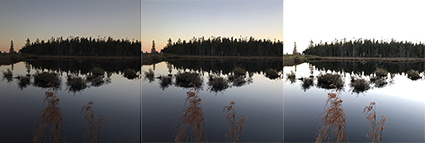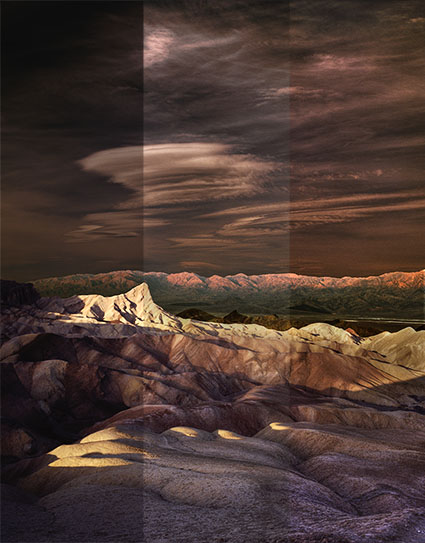
Get 15% off Photomatix with this code – johnpaulcaponigro.

Beyond Photoshop, there are a number of HDR software options, both plug-ins and stand-alones. Some of the better-known programs include Artizen HDR, easyHDR, FDRTools, pfstools, HDR Efex Pro, and Photomatix. HDRsoft’s Photomatix is the longest standing and perhaps most robust and sophisticated solution.

Photomatix can be used either as a Photoshop plug-in or as a stand-alone product. It offers a variety of ways of combining exposures, including some non-HDR options. Photomatix offers impressive controls over essential image elements affected by HDR merges. Chief among these are control over halos, micro-contrast accentuation, micro-smoothing and control of saturation in highlights and shadows (areas that tend to need aggressive tone mapping).

With a little care and attention, the effect you produce with these tools can be one of your choosing. If used aggressively, you can produce a contemporary HDR effect that can give your images a new look. If used conservatively, you can produce a classic effect that’s virtually unnoticeable.

Every photographer can benefit from learning HDR techniques …

Read my review of Photomatix here. Stay tuned for the update.

Read more about HDR techniques here.

View more about HDR in my DVD Extending Dynamic Range – HDR Imaging.

Learn more in my digital photography workshops.

ChrisAlvanas_Apple3GS

Chris Alvanas has been keeping his photography fresh with his iPhone.

See it in his new book Apple 3Gs.

Read my iPhone articles on The Huffington Post.

Find iPhone accessories I recommend here.

Jan Kabili – Photoshop CS5 Faux HDR

Jan Kabili – Photoshop CS5 Surreal HDR and Removing Ghosts

Learn more about Photoshop and Lightroom in my DVDs and Workshops.

Exposing for HDR

February 20, 2010 | Leave a Comment

Learn what you need to do during exposure to make the best HDR merges.
And what to look out for.

I cover a full range of techniques to extend dynamic range in my DVD.
XDR – Extending Dynamic Range – HDR Imaging.

What to Look for in HDR

December 18, 2009 | 1 Comment

alvanas_hdrferriswheel

Chris Alvanas’ image (above) is an excellent example of heavy HDR.

Last week I taught my most advanced Fine Art Digital Printing Advanced workshop ever. We talked not only about how to use HDR tools but also the visual effects they produce. HDR processing creates several identifiable artifacts. Going to extremes will help you identify the possibilities and the artifacts more clearly. After that, you can better decide just how far you want to go. Clearly identifying these artifacts can help you control them and craft your own HDR style.
1    Full detail in shadows and highlights
This is the reason special software was invented.
Pushed far blacks and whites can get gray.
2    Accentuation of contour
Images look sharper and clearer. It’s Clarity on steroids.
Pushed far this leads localized vignetting.
3    Accentuation of texture
Talk about detail.
Pushed far it gives objects a stained (“grunge”) appearance and boosts noise.
4    Distortion of relative saturation relationships
Sometimes it’s beautiful, sometimes it’s unnatural, sometimes it’s beautifully unnatural.
A little post-production work will help you get the balance that’s best for you.

Learn more in my free Lessons.
Learn more in my HDR DVD.
Learn more in my Workshops.
Next FADP Advanced workshop 2/1-5

alvanas_hdrportraits

hooper_hdrportrait

Last week I taught my most advanced Fine Art Digital Printing Advanced workshop ever. A number of the participants work with HDR. So we explored a variety of HDR styles.

Chris Alvanas likes heavy HDR processing to give his contemporary portraits a grittier look.
Jim Hooper likes to blend normally processed Raw files with HDR processed files for a blend of classic and contemporary.

HDR techniques can be used to generate many different effects. They’re useful techniques every photographer should know about.

Learn more in my free Lessons.
Learn more in my HDR DVD.
Learn more in my Workshops.
Next FADP Advanced workshop 2/1-5

3 New DVDs !

November 30, 2009 | Leave a Comment

3newdvds

3 New DVDs!

Fine Art Digital Printing

Fine Art Workflow

Extending Dynamic Range – HDR Imaging

Preorder discounts apply for a limited time only. Save $10.

Read more on Printing in my free Lessons.
Learn more in my Fine Art Digital Printing Workshops.


Every year PhotoPlus East is the biggest professional photographers trade show of the year. October 22-24, 2009. Located at the Jacob Javits Center in New York City the show boasts a huge expo floor, hundreds of exhibitors, thousands of new products and a conference with over 100 seminars.

I’ve been going for years first as an attendee and then later as a presenter.
My sessions this year include …

The Fine Digital Print
Oct 22, 2009 – 3:30 PM to 5:30 PM

Extending Dynamic Range – HDR
Oct 23, 2009 – 8:45 AM to 11:45 AM

Photoshop Color Strategies
Oct 24, 2009 – 1:15 PM to 3:15 PM

Check out the full list of seminars here.

HDR Aesthetics

March 18, 2009 | 1 Comment

HDR imagery is expanding today’s photographic aesthetics. Identifying the characteristics of contemporary HDR images will help classicists and pioneers alike. The basic ingredients are desirable for both sensibilities, but in varying combinations and to different degrees. As with solving any problem, it’s easier if you break it down into it’s component pieces and then learn what each one does and how they interact with one another. First know what to look for. Second, know what a tool can do. Third, know how to apply a tool. Once you’ve done this, you’ll be well along the way to crafting a unique style that’s all your own.

Pronounced Shadow and Highlight Detail
Accentuated Edge Contrast
Accentuated Texture
Increased Noise
Smoothed Texture
Saturation Distortions

Read more in the current issue of Digital Photo Pro.

Learn these and other techniques in my workshops.

LDR

Half HDR

HDR Simulated

HDR Simulated With Photomatix

How The Camera Sees

November 18, 2008 | Leave a Comment

Like the human eye, film has a nonlinear response to light. For film, we adjust the EV to fit the amount and contrast ratio of the available light into the most useful area of its curve response. Using film, you expose generally, and when compromises need to be made, you favor shadows or highlights. Details lost at the point of capture are irrecoverable.

Unlike the human eye, CCDs have a linear response to light. They simply count photons, with no scaling. Consequently, in linear capture (RAW), half the data in the file is contained in the top EVs of the tonal scale, and the quality of the data in the lowest EVs is comparatively poor (susceptible to noise and banding). RAW files without conversion look very dark. When converted, a tone curve is applied (gamma encoded) to make them appear normal. The images are mapped to an output-referring standard.

What does this mean practically? Expose high. The histogram above might look good on the back of your camera but it’s actually underexposed. Half the potential data is unused (top eigth). This file will get noisy fast.

Find out more about HDR images in my current series in Digital Photo Pro.

Learn this and other techniques in my workshops.


-

Today I present a seminar Extending Dynamic Range. Extending dynamic range is one of the fundamental challenges of photography since it’s invention. All forms of visual representation map the appearance of a high dynamic range scene into a low dynamic range medium (typically print). There have been many approaches to solving this problem throughout history. Now, with new technology, there are new approaches. HDR merges are popular now. In time, all of our imagery will be able to incorporate increasingly high dynamic range information.

Here’s a comparison of contrast ratios from very high dynamic range self-luminiscent objects to low dynamic range prints.

sun to starlight                                 1,000,000,000,000:1
human vision w/ dark adaptation      100,000,000:1
Spherocam HDR camera                    50,000,000:1
Brightside monitor                            200,000:1
human vision – single  view               10,000:1
b/w negative film                              10,000:1
typical DSLR                                      500:1
LCD monitor                                      400:1
CRT monitor                                      200:1
paper – best possible                        100:1
paper – typical                                   50:1

Check out my free downloads here.
Check out my workshops here.


Colin Smith quickly details his recommended workflow for integrating Photoshop and Photomatix’s plug-in for HDR images in this useful excerpt of his HDR DVD.

Check out Colin’s HDR DVD here.

Check out my articles on Extending Dynamic Range at Digital Photo Pro.

Check out my upcoming seminar on HDR at PhotoPlus.

Check out my workshops here.

PhotoPlus East starts next week.

It’s the premiere photographic tradeshow in the US.

The presentations at manufacturer booths are free.

The seminars are fee based.

Both are are excellent.

I’ll be presenting a number of sessions.

Thursday, Oct 23

9-12             Fine Art Workflow (with Mac Holbert)(TA10)
3:30-4:15     Lightroom 2 – Fine Art Output (Adobe Booth)

Friday, 10/24
9-12              Extending Dynamic Range (FA7)
2-3                Epson Poster Signing (Epson Booth)

Saturday, 10/25
9-12              The Fine Digital Print (SA9)
12:30-1:15     Lightroom 2 – Fine Art Output (Adobe Booth)


Colin explains HDR imagery in this excerpt of his HDR DVD.

Check out Colin’s HDR DVD here.

Check out my articles on Extending Dynamic Range at Digital Photo Pro.

Check out my upcoming seminar on HDR at PhotoPlus.

Check out my workshops here.

Ben Willmore showed up as a guest on Bert Monroy’s Pixel Perfect show to do a two-part installment about High Dynamic Range (HDR) photography. In the first installment of the show he covers the basics of shooting for HDR, merging exposures, and tonemapping. In the second installment of the show, he covers postprocessing HDR merges.

First, view it here.
Then check out Ben’s even more detailed DVD HDR Mastery.

If you’ve watched these installments or Ben’s DVD tell others what you think here.

Comment!

Subscribe

Get the RSS Feed  

Subscribe by Email


    Categories

  • Archives

  • Blogroll

    Topics & Friends