Explore The Power Of Color Psychology

The Art Of Color Adjustment

Download your free copy now!


The power of color offers you extraordinary creative capabilities and you’ve never had more control than today.


Strategies


Infinite Variations
The possibilities are almost limitless. Explore your options before you commit to a solution.

Use Presets To Find Variations Quickly
Speed your workflow and visualize many possibilities for your images.

Why Achieving Neutrality In Your Images Is So Important
Make your color more believable, saturated, and three-dimensional.

4 Ways To Achieve Neutrality
How you achieve neutrality sets the foundation for future color moves.

How To Key Your Images Expressively – Go High, Medium, Or Low
Set the mood for your images with tonality.

The Key To Lively Images –  Midtone Contrast – And How To Get It

6 Ways To Get Better Shadow & Highlight Detail
Increase separation in the darkest and lightest values.

5 Tools You Can Use To Make The Most Of Shadows & Highlights Without HDR
You can extend the dynamic range of your images without bracketing exposures.

Why Shadow Detail In Photographs Is Sometimes Overrated — Plus Seven Masters Who Lose It

How To Lose Shadow Detail In Photographs — 29 Ways Counted

How To Avoid Making Viewers Squint At Your Images To See Their Highlights
Preserving detail and setting brightness are important first steps.

How To Render Lively Shadows

3 Qualities Of Light You Can Use To Make Your Images Glow

How To Use Simultaneous Contrast To Make Colors Even More Lively

9 Ways To Tell If Your Images Are Overcooked

How To Make Day Look Like Night In Your Images

How To Enhance The Illusion Of Space With Atmospheric Perspective

Deciding Where To Make Your Images Glow And How To Do It  | Coming Soon


Raw


What In The World Are Raw Files?
Dive in to the strange and wonderful world of Raw files.

Why You Should Shoot Raw
Get highest quality images from your digital camera.

Why You Should Profile Your Camera
Improve the clarity and saturation of the color your digital camera creates.

How To Get More Than The Maximum A Slider Allows
Get 150%,  200%, 500% or more out of sliders.

5 Reasons You Still Need Photoshop
1  Fine Retouching, 2  Precise Masking, 3   Advanced Color Adjustment, 4  Creative Sharpening, 5  Plug-Ins


Tools


How To Evaluate Color Adjustment Tools
Identify the go-to, exotic, and redundant tools.

Blend Modes
Make all of Photoshop’s color adjustment tools more precise.

Curves
It’s the most precise tool for adjusting luminosity and hue.

High Pass Contrast
Make your photographs appear more three-dimensional.

High Pass Contrast Or Sharpening – How To Choose An Optimal Setting
Choose between planar contrast or edge sharpening.

Curves, Clarity, Dehaze, High Pass, Texture and Sharpening Compared
How do you choose between so many ways to control luminosity contrast?

Curing Dehaze Color Artifacts
Try this quick fix to eliminate Dehaze color artifacts.

Hue/Saturation & Vibrance & HSL Compared
They’re the most powerful tools for adjusting saturation.

White Balance, Photo Filter, Color Overlays, and Curves Compared
How do you choose between so many ways to control color temperature?

Selective Color
It makes very precise changes like no other tool.

Use LAB Color Mode To Increase Hue Contrast
Use LAB mode for greater hue separation.

Blending Channels
Use the information in one channel to improve another.

Adobe Camera Raw Filter
Using ACR on layers lets you use Photoshop’s precise masking with it.

Color Lookup
Color grading can give many images a similar look or individuals a unique one.

Color Grading
Make the color in your images more expressive with this easy split toning solution.

Gradient Maps
Add new color into specific ranges of luminosity.

Match Color
Transfer color from one image to another.

Synthetic Profiles
Make big changes non-destructively by redefining color values.

Before You Mask Use The Tool’s Selectivity | Coming Soon
The results are faster and sometimes better.

What You Can Do With Raw That You Can’t With Photoshop Unless … | Coming Soon
Adjust Raw files and individual layers with the most robust color adjustment feature.


Sign up for Insights for news of new content!

Color Theory

.

Understanding color theory will help you appreciate and make more effective color choices.


Describing Color


The Best Books On Color Theory
Deepen your appreciation and understanding of color with these books.

What Is Color Theory ? | Download
Here are the essentials on which you can base your conceptual foundation of color.

All The Words Of The Rainbow
Find the words to describe that color or figure out what that word means.

3 Types of Color

3 Elements of Color

Luminosity – Lightness | Coming

Saturation – Intensity

Hue – Color Temperature

Atmospheric Perspective

Day For Night

Gradation

The Weight Of Color

Transparency & Translucency

Simultaneous Contrast

Proportion | Coming


Color Wheels


A Brief History Of The Color Wheel

Why Photographers’ And Painters’ Color Wheels Differ

How To Use Color Wheels | Coming

Graphing Color

Color Analysis


Going To The Movies


What In The World Is Color Grading?

How Classic Movies Use Color To Tell Compelling Stories

10 Best Uses Of Color In Movies

Understanding Wes Anderson’s Unforgettable Color Palettes In 10 Movies

4 Movies That Showcase Zhang Yimou’s Brilliant Use Of One Color Dominance

8 Movies That Use Day For Night Beautifully

How To Decode Color  In Christopher Nolan’s Amazing Movie Inception

7 Movies That Mix Black & White And Color Brilliantly

The 25 Most Beautiful Black-And-White Movies


Color Palettes


An Artist’s Palette | Download
One of the most distinctive things about an artist’s work is his or her use of color.

One Strategy For Creating Many Successful Color Palettes
Most successful palettes do this one thing.

How To Find The Infinite Color Possibilities One Image Contains
The possibilities seem limitless. Explore your options before you commit to a solution.

Why B&W And Color Don’t Mix
They’re two different realities; unless you use them as a code for that, present them separately.

B&W Palettes | Download
Here are a few examples of black and white palettes drawn from the history of photographic practice.

B&W Expanding The Definition | Download
What is a black and white image?

5 Photographers With Signature B&W Styles

Palette – Light | Coming

Palette – Medium | Coming

Palette – Dark | Coming

Palette – Low Contrast | Coming

Palette – High Contrast | Coming

Palette – Spotlit | Coming

Palette – Ideal | Coming

Palette – Ambient | Coming

Palette – Synthetic | Coming

Palette – Super Saturated | Coming

Palette – Pastel | Coming

Palette – Semi-Neutral | Coming

Palette – Neutral | Coming

Palette – Monochromatic | Coming

The Colors Of The Seasons | Coming

The Colors Of A Place | Coming

Day For Night


Ways To Improve Your Color Perception


Check For Color Blindness

Take The X-Rite ColorIQ Challenge

Play The Game – I Love Hue


Exercise – Memory
| Coming

Exercise – After Image | Coming

Exercise – Transparency | Coming

Exercise – Intervals | Coming

Exercise – Simultaneous Contrast 3=4  | Coming

Exercise – Simultaneous Contrast 4=2 | Coming

Exercise – Optically Neutral  | Coming

Exercise – Analysis  | Coming


4 Ways To Enhance Color Temperature In Your Images

What Is Color Temperature ?

Of the three elements of color (luminosity, hue, and saturation), hue is the one most closely associated with temperature.  This is a psychological temperature, not a physical temperature. Most people associate red with fire or blood (warm things) and blue with sky, water, and ice (cool things), where physically a blue flame is hotter than a red flame. You can identify which hues are warmer and which are cooler by their proximity to the absolute poles of red (warm) and cyan (cool) on the color wheel. When comparing any two hues, you can always ask, “Which one is warmer and which one is cooler?”. Even when comparing two variations of the same hue, very often one will be slightly warmer or cooler. Color temperature is part of what creates color variety, which is one spice of life, a very important one, especially when it comes to visual communication.

The Things You Can You Do With Temperature

Many photographers think of color temperature as something to "get right" during exposure, but you can also use color temperature creatively in post-processing. You can produce many compelling color effects with color temperature. You can make distant close layers feel closer by warming them and distant layers more distant by cooling them. You can make objects feel more three-dimensional by warming highlights and cooling shadows. You can add a warm glow that simulates early morning or late evening light. You can  You can even make day look like night by dramatically cooling it. And every one of these moves will change the emotional tone of an image. Temperature is a critical element for communicating with color.

Lightroom & Photoshop

There are many color adjustment tools in Lightroom and Photoshop that adjust hue. Having used them all since the day they were released (or before), I regularly use four and consider them go-to tools worth mastering.


Insights Members can login to read the full article.
Email:
or Sign up

Why Neutrality In Your Images Is So Important
Constellation_XIX_425

Achieving neutrality in your images is so important. Few things are as important. Why?
Here are four reasons.

1 – The color in your images will appear more believable.

Casts make colors seem false. This is true for memory colors like fire engine red, sky blue, and grass green, particularly true for flesh tones (Are you feeling a little bit green today?), but nowhere more true than with neutrals. There can be some debate about which blue is sky blue. On which day? At what time? But there’s very little debate about what gray is truly neutral. Sure those neutral grays can vary in brightness but not hue or saturation. Make the neutrals in your images truly neutral, and you’ll make the other colors in your images more believable.

2 – The colors in your images will look more saturated.

When you remove color casts you can see the colors beneath them more clearly. The color beneath appears purer. This effect won’t be as strong as if you had increased their saturation. It will be subtler but more convincing. Oversaturated colors often appear false and you’ll have to work the saturation of your colors twice as hard if they contain color casts. Clean color is a great foundation to add saturation to. You can get the best of both worlds.

3 – Your images will appear more three-dimensional.

Without casts, the colors in your images will have more contrast.

They’ll have more luminosity contrast. When they’re not unified by a color cast, luminosity or brightness values will become more distinct.
They’ll have more hue contrast. Often shadows will appear cooler while highlights appear warmer, making them appear even more different than they already are.

They’ll have more saturation contrast. When neutrals are neutral, you’ll get maximum contrast between them and the more saturated colors in your image.

Add these three kinds of color contrast together, and you’ll see a dramatic difference in your images. The illusions of three-dimensional depth and volume in our two-dimensional images will be significantly amplified.

Once again, these effects will be powerfully felt but not obvious. Clean colors won’t call attention to themselves because they seem natural, unlike imbalanced images that you’ll need to over-process to get similar effects.

4 – You’ll have the best color foundations to make black-and-white conversions from.

It sounds strange when you first hear it but color matters even when you’re going to remove it. The maximum hue and saturation separation created by achieving neutrality gives you more control over how dark or light to make hues during conversions to black and white.

5 – You’ll know color management is working.

Neutrals are one of the first things to look for when you’re checking your color management for printing, whether it’s evaluating a viewing light, examining a profile, a rendering intent, or a media setting. You not only look for neutral midtones but also neutrals throughout the entire tonal scale (gray balance). If you’ve achieved both your color management is working correctly. If not, check your system.
I’m sure you’ll find a few more reasons why neutrality in your images is so important.

Achieving neutrality in your images isn’t something you do for all of your images. There are many exceptions. Nevertheless, being able to achieve neutrality in your images is a critically important skill. When you know how and why to achieve neutrality all of your color choices become more sensitive, deliberate, and meaningful.

Read more on Color Adjustment here.
Learn more in my digital printing and digital photography workshops.
4 Ways To Achieve Neutrality In Your Images

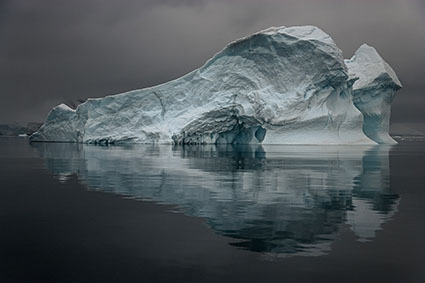
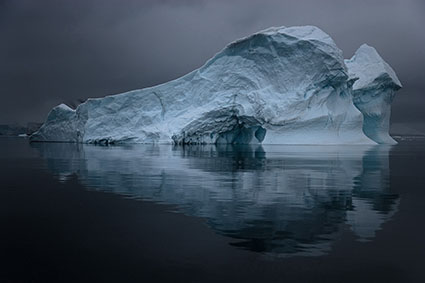
Antarctica XLII
There are many ways to achieve neutrality in your images. The results they offer are not same. You need to know the differences so you can make better choices and get solutions that are right for you and your images. Explore them and you’ll be more likely to make better choices for your images in the future. Keep exploring them and you’ll open up a world of possibilities within your images.
WB

Antarctica XLII

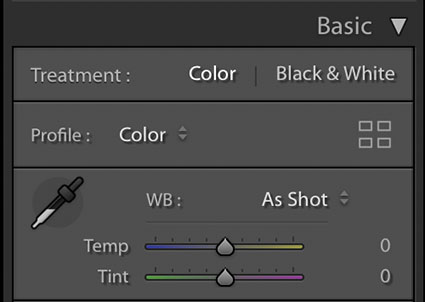
Lightroom & Camera Raw White Balance Dropper and Sliders
The simplest way to achieve neutrality is to correctly set white balance during Raw conversion with Lightroom or Camera Raw. Click on the eyedropper tool and click on a target area within the image. It’s that simple.

What’s not so simple is identifying a good target. This will be easy if you photographed a color checker within the image or in a separate exposure at the same time, but few do. If you’re like most photographers, you’ll have to identify a good target visually, introducing a margin of error equal to your discernment. Usually, the best choices are midtones. This tool also works well with highlights, but they’re more likely to carry color casts that you won’t see at first glance.

After you click on a target, the results can be refined further with the Temperature (blue to yellow) and Tint (green to magenta) sliders.

Remember, you can use Camera Raw as a filter in Photoshop too.
17_MatchColor
Antarctica XLII

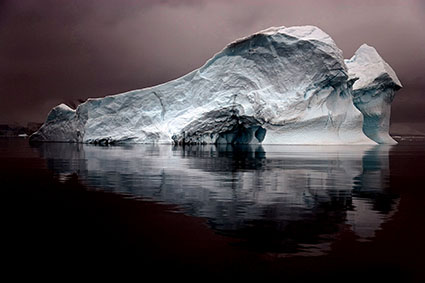
Normal blend mode

Color blend mode

Antarctica XLII
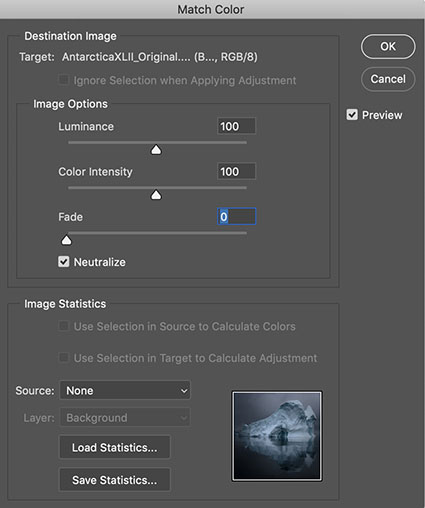
Match Color
Match Color is Photoshop’s often unfound and overlooked feature that offers such sophisticated results when neutralizing colors that it’s often surprising. Not all colors will be affected equally – and that can be a good thing. Using Match Color is even easier than using Lightroom / Camera Raw’s white balance eye-dropper because you don’t need to click on a target. Simply check the box Neutralize – and leave all the other sliders and drop-down menus alone.


Insights Members can login to read the full article.
Email:
or Sign up

How To Master Saturation In Your Images

Saturation Is An Essential Key To The Success Of Your Images

One of the most distinctive features of a visual artist’s use of color is their use of saturation. When you think of Ansel Adams’ photographs, you think of neutral images rather than highly saturated ones. When you think of Matisse’s paintings, you think of supersaturated images rather than neutral ones. Think of your use of saturation as an essential element that will help you define your own signature style.
One of three elements of color (luminosity, hue, and saturation), saturation can give your images specific qualities of energy and light. Here are five things you can do with saturation: one, increase energy and impact; two, add complexity by revealing hidden hues; three, restore life to listless hues; four, calm colors that are distracting; or five, produce softer semi-neutral and pastel palettes.

Read more about Saturation here.

Together, Adobe Lightroom and Photoshop offer an impressive, almost overwhelming, array of possibilities for controlling saturation. Do three things before you choose a tool to adjust saturation with. First, understand and develop your eye for saturation. Second, adopt a consistent strategy for exploring the possibilities it offers your images. Third, understand the differences between the tools, both how they function and the effects they produce.

Know What To Look For

Knowing what to look for will help you choose a direction, a tool, and how far to go with it. It will also help you evaluate the results you produce – and quite possibly improve them further.


Insights Members can login to read the full article.
Email:
or Sign up

The Caponigros – Two Generations Of Photographers

.

In this video my father and I share insights into our creative lives and our passion for printing.

View photographs here.

Find quotes here.

Read Q&A here.

Find conversations here.

Learn more in my digital printing workshops.

What In The World Is Color Psychology ?

Flypaper Textures Autumn Painterly Collection Texture for artwork and photography from Flypaper Textures
Color psychology is the study of how color affects human behavior. It’s a long-standing, field used in art, design, marketing, sports, medicine, and much more.

Despite its long history and widespread use, there’s a lot more to discover about how color affects people scientifically. Here’s are a few facts that have been scientifically proven.

We see certain colors more quickly than others.

Warm colors are stimulating and cool colors are calming.

A red room feels 10 degrees warmer, while a blue room feels 10 degrees cooler.

Colors can enhance the effectiveness of placebos.

The presence of green speeds healing.

Athletes perform better in certain colors and get penalized more in others.

Clearly, the responses to color are at once physical, psychological, and social, so identifying the strongest contributor(s) to a response(s) is no easy matter. The more social the response, the more likely it is to vary between individuals. Socially, color psychology has many layers – universal, cultural, regional, communal, individual. And then there’s time. Age (as well as gender) can also influence how a person perceives and interacts with color. An era or a moment can become important factors too. It’s complicated but it’s fascinating!
Color affects body, mind, and emotions. Color can be used by physicians to promote physical and psychological health, by businesses to brand identities and influence purchasing decisions, by political movements to propagate values and ideas, and by artists to communicate aesthetics and emotions. Color is a powerful communication tool that can be used to influence perception, mood, and action.

Considering the psychological dimensions of color consciously will give you a greater awareness of the phenomenon of color and improve your ability to communicate with it. Remember, there are shared responses to color and you have your own individual responses to color. Being able to tell the difference can be insightful. This mindfulness is something every visual artist will benefit from.
How will you use color?

Read more on Color Psychology here.
Learn more in my digital printing and digital photography workshops.